 Magpie Search
Semantic search explained: finding files by meaning, not keywords
How meaning-based search works, when it beats keywords, and how to run it privately on your own PC.
The short answer: keyword search finds files that contain the words you typed. Semantic search finds files whose meaning is close to what you typed, even if they use different words. It works by turning each passage of text into a list of numbers (an “embedding”) that describes what it's about, and comparing those lists. You can use it on your own PC, privately, with Magpie Search's optional Find by meaning.
Where keyword search falls short
Keyword search is precise. Type invoice INV-2042 and you get exactly the files that contain those strings. But it relies on you remembering the words the author used:
- You search how do plants make food; the lecture says photosynthesis and chemical energy.
- You search car insurance; the PDF says motor policy.
- You search laptop won't start; your note says notebook doesn't boot.
Every result is missed, because no word matches. That's the gap semantic search fills.
How semantic search works
- Split the text. Each file's text is cut into passages of about a paragraph. In Magpie that's roughly 900 characters.
- Embed each passage. A small language model reads a passage and outputs a fixed list of numbers, 384 of them in Magpie's models. Passages about similar things end up with similar lists, even if they share no words.
- Embed the question. When you search, your words go through the same model and become 384 numbers too.
- Find the nearest. The passages whose numbers are closest to the question's (measured by cosine similarity, the angle between the two lists) are the best matches by meaning.
- Combine with keywords. Good systems merge meaning matches with normal word matches. Magpie uses reciprocal rank fusion: each file gets a score from its position in both lists, so files that match your words and your meaning come first.
When to use meaning, and when to use words
| You're looking for | Best approach |
|---|---|
| An exact code, number or name (INV-2042, QX7P2M) | Keywords, or re: for patterns |
| A phrase you remember word for word | Keywords in “quotes” |
| A document you remember the topic of, not the wording | Meaning |
| Notes or reports on a subject, worded differently | Meaning |
| Something in another language than your query | Meaning, with the multilingual model |
Limits worth knowing
- It always returns something. The closest passage isn't necessarily close. Treat meaning-only matches as suggestions.
- It needs text. A picture is understood through the text read from it with OCR, not by what it shows.
- Small models are good, not perfect. On-device models trade some understanding for speed, size and privacy.
- It takes extra time once. Every passage has to be embedded after the normal reading finishes.
Using Find by meaning in Magpie Search
- Turn it on in Settings › Indexing › Find by meaning, and pick a model: English (23 MB) or Multilingual (about 118 MB, about 100 languages). On stronger PCs, Magpie may already have turned it on at first run.
- Let it learn. After normal reading finishes, Magpie spends a little extra time on each file. The status line says Learning meanings.
- Search with the light bulb on. The light-bulb button in the search box switches meaning matches on or off for your searches.
- Read the label. Results found only by meaning are marked similar meaning.
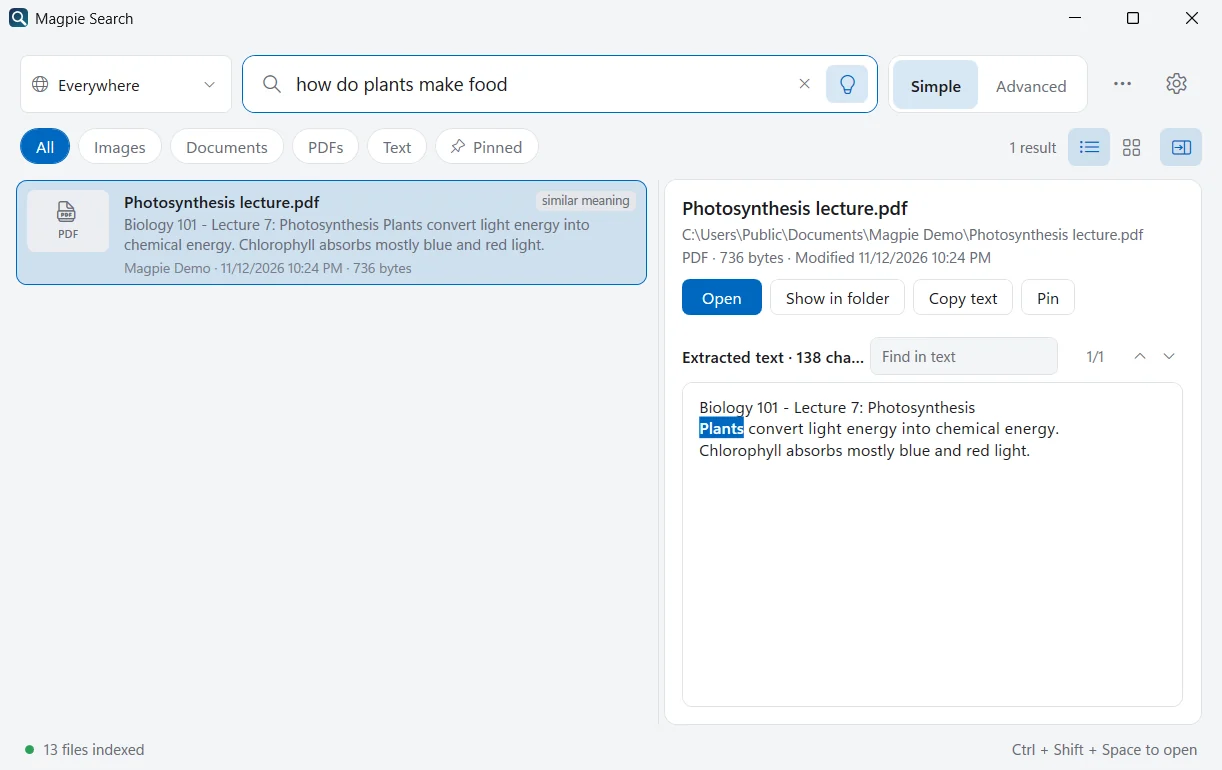
Everything runs on your PC: the model, the embeddings (stored compactly in the same local database as the text) and the search. Nothing is sent to an AI service.
A worked example
Suppose your Documents folder contains a lecture handout that reads: “Plants convert light energy into chemical energy. Chlorophyll absorbs mostly blue and red light.” You search for how do plants make food.
- Keyword search looks for how, do, plants, make and food. Only plants appears in the handout; since every word must match, the handout isn't found.
- Meaning search turns your question and the handout's passage into lists of numbers. The model has learned that “making food” for plants and “converting light into chemical energy” describe the same process, so the two lists point in nearly the same direction, and the handout comes out on top.
In Magpie, that handout appears marked similar meaning, because it matched by meaning and not by words.
On your PC or in the cloud?
Many semantic search services send your documents to a server to compute embeddings. That's convenient for files already in the cloud, but it means a copy of the text leaves your PC. Small models such as MiniLM and multilingual e5 are compact enough to run on an ordinary laptop processor. Magpie uses them locally, so the embeddings are computed and stored on your PC, and your text never leaves it.
Tips for better meaning searches
- Describe the content, not the file: notes about renewing my passport rather than passport doc.
- Use a few words. One-word queries carry little meaning; whole sentences work well.
- Combine with filters:
type:pdf rules for working from homesearches only PDFs by meaning and words.
Keyword and meaning search compared
| Keyword search | Meaning search | |
|---|---|---|
| Matches | The exact words (or their beginnings) | Passages about the same thing |
| Strong at | Codes, names, numbers, exact phrases | Topics, questions, different wording |
| Weak at | Synonyms and paraphrases | Exact codes and rare names |
| Cost | A small full-text index | A model and 384 numbers per passage |
| In Magpie | Always on | Optional, combined with keywords |
Frequently asked questions
Is semantic search the same as asking a chatbot?
No. A chatbot writes an answer. Semantic search only ranks your existing files by how close their meaning is to your question, and shows you the files. Nothing is generated.
Does Find by meaning send my files to an AI service?
No. Magpie's model runs on your PC. After the one-time model download, finding by meaning works offline, and your files and their text never leave your computer.
Which model should I choose?
English (23 MB) is small and fast and fine if your files are in English. Multilingual (about 118 MB) understands about 100 languages, including Persian, Arabic and Chinese. Choose it in Settings › Indexing › Find by meaning.
Why do some meaning results look unrelated?
Meaning search always returns the closest passages it has, even when nothing is a great match. Results that only match by meaning are marked “similar meaning”, and files that match your words too are ranked first.