 Magpie Search
How to search all your Markdown and text notes across folders
Search .md, .txt and log files across many folders at once, with built-in commands or an instant index.
The short answer: notes in Markdown (.md) and plain text (.txt) are easy to search because they're already text. You can use findstr or PowerShell's Select-String from the command line, VS Code's “Search in folder”, or Windows Search once you tell it to index .md contents. For instant search across many folders, with previews and highlights, Magpie Search reads .txt, .md, .markdown and .log files by default, plus any extensions you add.
Method 1: make Windows Search index your notes
File Explorer searches .txt contents in indexed folders, but by default it doesn't look inside .md files. To change that:
- Open Start, type Indexing Options and open it.
- Click Modify and tick the folders that hold your notes.
- Click Advanced › File Types.
- Find md in the list. If it isn't there, type
mdinto Add new extension to list and click Add. - Select it and choose Index Properties and File Contents. The filter should show as a plain-text filter. Click OK.
- Repeat for
markdownor any other note extension you use.
Then search in File Explorer with content:timeout ext:.md. Limit: results show file names only, without the matching line.
Method 2: the command line
findstr (Command Prompt)
From the folder that holds your notes:
findstr /s /i /m "timeout" *.md *.txt/s searches subfolders, /i ignores case, and /m prints only the names of matching files. Leave out /m to see the matching lines.
PowerShell
Get-ChildItem -Recurse -Include *.md,*.txt |
  Select-String -Pattern "timeout" |
  Select-Object Path, LineNumber, Line
This prints each match with its file and line number. Select-String understands regular expressions, so -Pattern "TODO|FIXME" finds either word.
Limits: every search reads every file again, which is slow for big folders; there's no index; and UTF-16 or unusual encodings can trip up findstr.
Method 3: your editor or notes app
- VS Code: File › Open Folder, then Ctrl+Shift+F. Put
*.mdin files to include. Excellent for one project folder. - Notes apps such as Obsidian or Logseq search their own vault quickly, but not notes scattered elsewhere on your PC.
Both work well inside one folder tree. They don't help when notes are spread across Documents, Desktop, project folders and old backups.
Method 4: Magpie Search across all your folders
Magpie Search reads .txt, .md, .markdown and .log files out of the box, detects their encoding automatically (UTF-8, UTF-16, or the Windows code page), and keeps the text in a local full-text index. Your notes become searchable alongside documents, PDFs and screenshots.
- Install Magpie Search and add your notes folders (Settings › Folders). Tick Subfolders for each.
- Add other text formats you use in Settings › Indexing, for example .csv, .json, .py or .org.
- Search. Type a word or use
ext:md,txtto search only notes.name:matches file names andcontent:only text inside files. - Read the note in the preview pane. Every match is highlighted; F3 jumps to the next one.
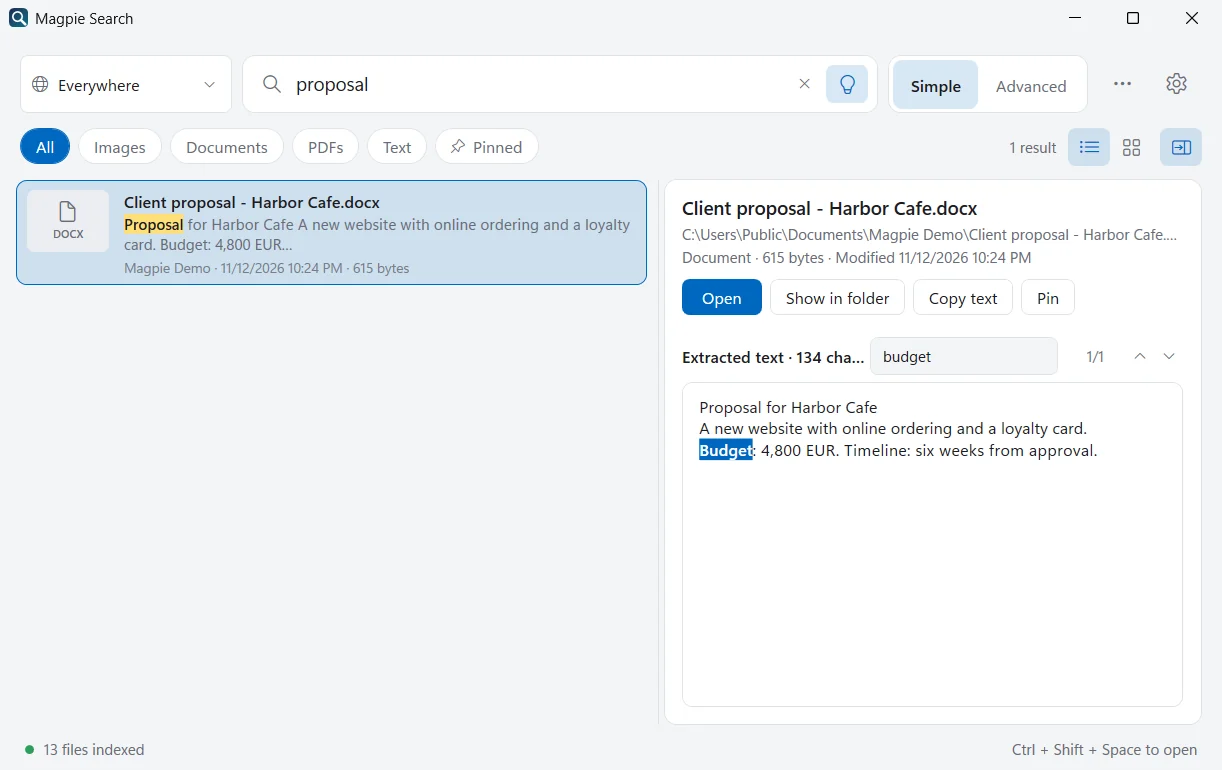
Searches for notes
- ext:md,txt meeting
- ext:md "action items" modified:7d
- ext:log content:timeout
- re:"TODO|FIXME" ext:md
- in:journal last month
Magpie watches your folders while it runs, so a note you've just saved is searchable a moment later. For questions where you don't remember the wording, Find by meaning finds notes that are about what you typed.
Code, data and config files
Plain-text formats beyond notes work the same way. Add the extensions you care about in Settings › Indexing, for example .csv, .json, .yaml, .py, .ps1 or .ini, and they're read as text. Some examples:
ext:json apiVersion: config files that mention a setting.ext:csv "Harbor Cafe": data exports that contain a customer.ext:py re:"def \w+_handler": functions that follow a naming pattern.
Build and dependency folders (node_modules, .git, bin, obj) are skipped automatically, so results stay focused on files you wrote.
Note-taking habits that make search better
- Write a descriptive first line. A title like Meeting with Harbor Cafe about the loyalty card gives search, and Find by meaning, far more to work with than notes 3.
- Spell out names and codes once. If you abbreviate a client or project, write the full name somewhere in the note.
- Date the file name. 2026-03-14 standup.md sorts well in Explorer, and
name:2026-03finds that month's notes. - Keep notes in a few folders rather than everywhere, and add those folders to Magpie with subfolders ticked.
Comparison
| Method | Across many folders | Speed | Shows matching text |
|---|---|---|---|
| File Explorer (indexed) | Yes | Fast | No |
| findstr / Select-String | Yes | Slow on big folders | Yes, as lines |
| VS Code / notes apps | One folder or vault | Fast | Yes |
| Magpie Search | Yes | Instant | Yes, full text highlighted |
What Magpie skips
To keep the index useful, Magpie skips hidden and system files, developer folders such as node_modules, .git, bin and obj, and files over 300 MB.
Search one folder, or everywhere
Sometimes you want every note; sometimes only one project's. Magpie's scope box, to the left of the search box, switches between Everywhere, a collection, or one folder (Ctrl+P opens it from the keyboard).
- Collections are optional names for groups of folders, such as Work, Uni or Home. Create one in Settings › Folders › New collection and tick its folders. They don't change what's read, only where you search.
- One folder is handy for a single vault or repository.
in:does the same from the search box:in:journalmatches files whose folder path contains “journal”.
Frequently asked questions
Why doesn't File Explorer find words in my .md files?
Windows doesn't index the contents of .md files by default. In Indexing Options › Advanced › File Types, add or select md and choose Index Properties and File Contents, and make sure the folder is indexed.
Can Magpie search .csv, .json or source code files?
Yes. In Settings › Indexing you can add extra extensions to read as plain text, such as .csv, .json or .py. Magpie skips developer folders such as node_modules, .git, bin and obj.
Does Magpie change my notes or add files to my vault?
No. Magpie only reads files. Its index lives in %LocalAppData%\Magpie, not in your notes folders.